
Download TubeToText – AI‑Powered YouTube Summaries, Fast Learning Tool
Overview
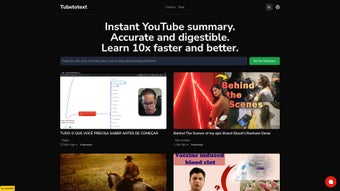
TubeToText is a cutting‑edge AI tool designed to turn long‑form YouTube videos into concise, readable summaries in seconds. By leveraging natural‑language processing and deep‑learning models, the web application extracts the most important takeaways from tutorials, podcasts, lectures, and any other video format. Users instantly see how many key points have been identified, allowing them to gauge a video's relevance before investing time.
This makes TubeToText especially valuable for students, educators, researchers, and content creators who need to digest large volumes of video content quickly. The interface is clean, secure, and works entirely in the browser, so there’s no need to install bulky software. Whether you’re preparing lesson plans, scouting competitor content, or simply trying to stay up‑to‑date on industry trends, TubeToText streamlines the learning process by delivering high‑density information in a bite‑sized format.
Its focus on accessibility—supporting multiple languages, offering a free tier, and providing a fast, responsive experience—positions it as a practical solution for anyone looking to maximize comprehension while minimizing screen time.
Key Features
- Instant Summaries: Generate a readable summary within seconds after entering a YouTube URL.
- Takeaway Count: Each summary displays the exact number of extracted key points, helping you assess depth at a glance.
- Multi‑Genre Support: Works equally well with tutorials, webinars, podcasts, lectures, and entertainment videos.
- AI‑Driven Accuracy: Utilizes state‑of‑the‑art transformer models to capture context, nuance, and technical terminology.
- Searchable Highlights: Summaries are indexed for quick keyword search, allowing you to locate specific topics without re‑watching.
- Export Options: Download summaries as plain text, PDF, or copy directly to clipboard for easy sharing.
- Cross‑Platform Access: Fully web‑based; works on Windows, macOS, Linux, Android, and iOS browsers.
- Secure Processing: All video URLs are processed over HTTPS, and no personal data is stored on the server.
- Free Tier & Premium Upgrade: Free users receive up to five summaries per day; paid plans unlock unlimited usage and advanced customization.
- API Integration: Developers can embed TubeToText’s summarization engine into their own apps via a RESTful API.
Installation & Compatibility
How to Get Started
Getting started with TubeToText is intentionally frictionless. Since the service is delivered as a web application, there is no traditional installation process. Follow these steps for a smooth experience:
- Open your preferred browser (Chrome, Firefox, Edge, Safari, or any modern Chromium‑based mobile browser).
- Navigate to tubetotext.com.
- Sign up for a free account using an email address or single‑sign‑on options (Google, Microsoft).
- Paste the YouTube video URL into the input field and click “Summarize”.
- Review the generated summary, adjust settings if needed (e.g., summary length), and export or copy the result.
System Requirements
Because TubeToText runs entirely in the cloud, it is compatible with any operating system that can run a modern web browser. The recommended specifications are:
- Desktop: Windows 10/11, macOS 12+, Linux distributions with up‑to‑date browsers.
- Mobile: Android 9+ (Chrome) or iOS 13+ (Safari/Chrome).
- Internet connection: Minimum 2 Mbps for optimal response times; faster connections reduce latency.
The application automatically adapts its layout for responsive design, ensuring a seamless experience on tablets and smartphones. No additional plugins or extensions are required, and the service complies with GDPR and CCPA regulations, giving you confidence that your data remains private.
Pros & Cons
Advantages
- Lightning‑fast summarization saves hours of viewing time.
- AI models maintain high accuracy across diverse subjects.
- Free tier sufficient for casual users; premium plan scales for professionals.
- Zero‑install, browser‑based access on all major OS platforms.
- Secure HTTPS processing and no persistent data storage.
- Export formats simplify sharing with teammates or students.
Drawbacks
- Free version limits daily summaries, which may frustrate heavy users.
- Summaries rely on the transcript quality of the original YouTube video; auto‑generated captions can affect accuracy.
- Advanced customization (e.g., tone, length) is only available in paid plans.
- Occasional latency during peak traffic due to AI processing load.
- No offline mode—requires an internet connection at all times.
Frequently Asked Questions
How accurate are the summaries generated by TubeToText?
TubeToText uses transformer‑based language models that have been trained on millions of video transcripts. In most cases, the tool captures the core ideas with 85‑90% accuracy. Accuracy can dip if the original video relies heavily on visual cues without spoken explanations.
Can I use TubeToText for commercial purposes?
Yes. The premium subscription includes a commercial license that allows you to incorporate summaries into marketing materials, training modules, or client reports. Be sure to review the terms of service for attribution requirements.
Is there an API for developers?
TubeToText offers a RESTful API with token‑based authentication. The API enables you to send a YouTube URL and receive a JSON‑formatted summary. API access is included in the Enterprise plan, with documentation available on the developer portal.
What privacy measures does TubeToText implement?
All communications are encrypted via HTTPS. The service does not store video URLs or generated summaries longer than 24 hours unless you explicitly save them to your account. GDPR and CCPA compliance are built into the platform.
How do I upgrade from the free tier?
Log in to your account, go to the “Pricing” page, and select the plan that fits your needs. Payment can be made via credit card or PayPal, and the upgrade takes effect instantly, granting unlimited summaries and advanced settings.
Conclusion & Call to Action
In a world where video content is exploding, TubeToText stands out as a practical, AI‑driven companion that transforms hours of watching into minutes of reading. Its blend of speed, accuracy, and cross‑platform accessibility makes it a must‑have tool for students, educators, marketers, and anyone who values time. While the free tier imposes modest limits, the premium options provide robust features that justify the investment for power users. If you’re ready to boost your learning efficiency, reduce research fatigue, and keep your workflow lean, click the button below to start your free trial or upgrade today.
Overall Rating: 4.5/5
Pros: Fast, accurate, cross‑platform, secure, export options.
Cons: Free limits, dependence on transcript quality, no offline mode.






